The SCUF Valor Companion App beta is now available for players looking to customize and fine-tune their controller experience. Designed to help you get the most out of your SCUF Valor, the app is available to download directly from the Microsoft Store on both PC (available here) and Xbox.
As we continue testing the SCUF Valor Companion App, we’ve identified several known issues that may impact your experience. Our team is actively working on fixes and improvements. Check the list below to view these issues along with available workarounds and troubleshooting steps.
Xbox Installation
Does this app work for all Valor controllers?
Yes, for Valor Wired with Hall Effect (non-TMR), you will need to follow these additional steps:
1. Download the Firmware Updater tool. This tool can be found at our download page.
2. Run the firmware update.
3. Download or connect to the Valor Companion App
For Valor Pro Wireless, and Valor Wired TMR, simply download the SCUF Valor Companion app on your Xbox or PC.
How do I get the SCUF Valor Companion app on Xbox?
Search the Xbox or Microsoft Store on your console or PC for SCUF Valor Companion Application. Download and install the Valor Wired TMR Companion App to your Xbox or PC. The application will then appear in your installed apps list, indicating that it is ready for use.
Connectivity & Firmware
Why isn’t my controller being recognized in the app on PC?
If the app doesn’t detect your controller, try navigating with the controller itself instead of a mouse. This usually restores functionality and lets you continue.
What should I do if a firmware update cancels or fails?
Restart the app, then retry the update without leaving the app during the process. Stepping away mid-update is the most common cause of cancellations.
Why doesn’t the Controllers screen show the latest firmware version?
Sometimes the firmware panel lags behind. You can double-check the correct version under Settings to confirm your controller is up to date.
Why is my controller stuck in calibration mode after canceling?
If calibration is canceled mid-process by pressing X in the app, the controller remains stuck in calibration mode. Attempting to recalibrate afterward will cause the app to freeze.
Unplug and re-plug the controller, then restart the app to recover. It is strongly recommended to complete the full calibration process once started
Configuration & Profiles
Why doesn’t the Configuration screen display my current settings?
Always make sure to save any changes before exiting. Without saving, your new settings may not display correctly when you reopen the app.
What happens when I press “Restore Defaults”?
Selecting Restore Defaults resets all profiles, not just the one you’re viewing. Keep this in mind if you only intended to adjust a single setup.
Why does profile navigation feel reversed when I have two controllers connected?
When cycling through profiles, the navigation order can feel counterintuitive. Use the d-pad or left stick to move more deliberately into submenus.
Why do my thumbstick and trigger preset graphs revert after saving?
Custom or preset response graphs set in the app revert back to Linear after saving and reloading a profile. This affects all presets on both PC and Xbox.
No workaround is currently available. Avoid relying on preset graphs until a software fix is released.
Why does my thumbstick output flip direction at high deadzone values?
Setting a thumbstick deadzone above 10% can cause the output to briefly jump to the opposite direction at full deflection. The default deadzone value of 7% is not affected.
Keep thumbstick deadzone values at or below 10% until a firmware fix is released.
UI & Controls
How do I know if my slider selection is active?
Move the slider to confirm its selection. Once adjusted, the app will register it as active.
Why does setting deadzone values to 100% cause issues?
Avoid maxing out deadzone sliders. At 100%, inputs may not register correctly. If this happens, restore defaults to return to stable performance.
How do I edit graphs more precisely?
Enter graph editing with the d-pad or left stick, then move points individually. This ensures adjustments are captured as intended.
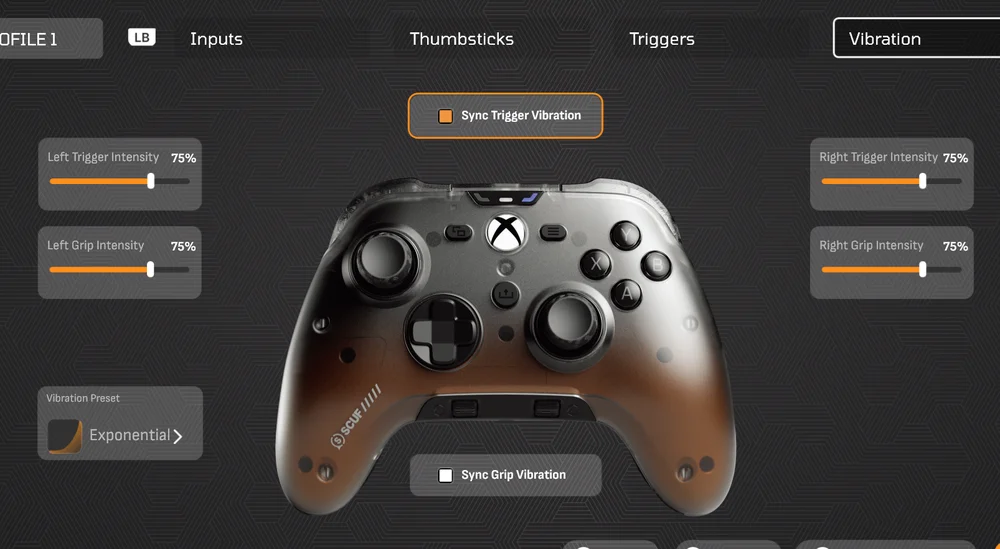
Why does hovering with my mouse change vibration graphs on PC?
Mouse hover can unintentionally alter vibration curves. For more stable editing, we recommend navigating with the controller instead.
General App Behavior
Why does switching away from the app cause an infinite load?
Keep the app in focus until the profile screen has fully loaded. Switching away interrupts the process and can cause endless loading.
What if calibration cancels when I press the X button?
If calibration is canceled, simply restart the process. The app will reset calibration normally.
Why do the arrows disappear on the Auto-Shutoff timer?
Sometimes the visual arrows vanish, but the timer adjustment still works as intended. You can continue adjusting without issue.
A Note on Other Issues
The above list covers the issues we’ve already identified and are working to address. If you have any comments or feedback, please reach out to us via the official Valor Companion App Reddit thread. Be the first to hear more about future updates by following SCUF on X, Facebook, Instagram, YouTube, Twitch, or Snapchat