Controller performance is critical to how games feel and respond. Whether you are playing competitively or casually, issues like stick drift, inconsistent movement, or inaccurate aiming can quickly impact enjoyment. Many of these problems are closely tied to calibration and dead zone settings. Understanding how these systems work and how to adjust them can significantly improve controller accuracy and longevity.
This article explains what controller dead zones are, why they exist, how calibration works, and how both can help address stick drift. It also highlights the tools available through SCUF controllers to help players fine-tune their experience.
What Are Controller Dead Zones?
A controller dead zone is a small area around the center of an analog stick where movement is intentionally ignored. When a stick rests at its neutral position, it rarely returns to a perfect zero input. Tiny fluctuations in the sensor can cause unintended movement, even when the stick is untouched. Dead zones are designed to prevent this.
In simple terms, dead zones tell the controller to ignore very small inputs near the center of the stick.
Why Dead Zones Are Needed
Dead zones serve several important purposes:
- They prevent unintended character movement or camera drift
- They account for natural wear and sensor variance
- They help ensure consistent neutral positioning
Without dead zones, even a brand-new controller could register movement when the stick is not being touched. As controllers age, dead zones become even more important because sensors wear down and become less precise.
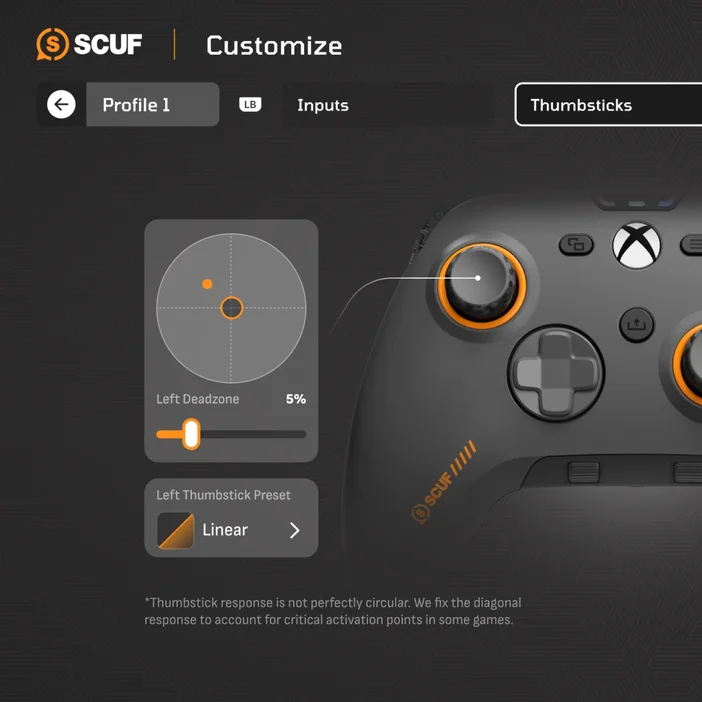
Dead Zone Meaning in Controller Settings
When you see a dead zone setting in a game or system menu, it usually refers to how much stick movement is required before the controller sends an input. A larger dead zone means the stick must move farther before registering. A smaller dead zone means inputs are detected more quickly.
High Dead Zones
- Reduce unintended movement
- Help mask stick drift
- Can feel less responsive or sluggish
Low Dead Zones
- Increase responsiveness
- Improve fine aiming and movement control
- Can expose stick drift or sensor noise
Finding the right balance is key. Competitive players often prefer lower dead zones for faster response, while casual players may prefer slightly higher dead zones for stability.
What Is Controller Calibration?
Controller calibration is the process of resetting or aligning the controller’s internal sensors so that inputs are read accurately. Calibration helps the system understand what the controller’s true center point is and how far the sticks can move in each direction.
Over time, analog stick sensors can drift from their original center due to wear, dust, or heavy use. Calibration helps correct this by redefining what the controller considers neutral and full input.
How Controller Calibration Improves your Experience
Calibration can improve controller performance in several ways. It restores accurate center positioning, improves directional consistency, reduces unintended movement, and helps games interpret stick input correctly. In some cases, calibration can noticeably reduce or eliminate minor stick drift without requiring hardware repairs.
What is Joystick Drift?
Stick drift occurs when a controller registers movement even though the analog stick is not being touched. This is one of the most common controller issues and can affect both console and PC players.
Common Causes of Stick Drift
Common causes of stick drift include sensor wear over time, dust or debris inside the stick module, manufacturing tolerances, and heavy or aggressive use. While severe stick drift may require hardware repair or replacement, many cases can be managed or minimized through dead zone adjustments and calibration.
How Dead Zones Help With Stick Drift
Dead zones are often the first line of defense against stick drift. By increasing the dead zone slightly, the controller ignores small unintended inputs near the center of the stick. For example, a controller that drifts slightly to the left may stop drifting if the dead zone is increased, and small sensor fluctuations can be filtered out entirely. This is why many games and systems allow players to adjust dead zones manually, giving users control over how sensitive their sticks are near the center. However, increasing dead zones too much can reduce precision, especially for aiming. The goal is to use the smallest dead zone possible that still prevents drift.
How Calibration Helps With Stick Drift
Calibration addresses stick drift at a different level. Instead of ignoring small inputs, calibration attempts to correct the stick’s center point. When you calibrate a controller, the system measures the current resting position of the stick, resets the neutral zone based on that position, and recalculates input accuracy. This can be especially effective if drift is caused by minor sensor offset rather than physical damage. Calibration is often recommended before adjusting dead zones too aggressively.
Stick Drift Testing and Diagnosis
Before making changes, it is helpful to perform a stick drift test. A dead zone controller test or calibration tool can show whether the stick is sending input while untouched. Signs of stick drift include cursor movement without input, a camera slowly rotating, or character movement when idle. Testing tools allow players to see raw input data and confirm whether drift is present and how severe it is.
System-Level Calibration Options
Calibrating a PS5 Controller
PlayStation systems include tools that help reset and update controller behavior. While full calibration options are limited at the system level, updates and resets can improve accuracy. Many games also include their own dead zone settings.
Xbox Controller Calibration
Xbox and PC platforms provide more robust calibration tools. The Xbox Accessories app allows users to test stick input, recalibrate certain components, and diagnose drift. These tools are often used alongside in-game dead zone adjustments for best results.
SCUF Tools for Dead Zones and Calibration
SCUF controllers are designed with performance customization in mind, offering software tools that provide deeper control over controller behavior. Currently, dead zone adjustment is available on the SCUF Envision Pro through the Corsair iCUE app, allowing players to fine-tune analog stick and trigger dead zones for faster response, better drift management, and profile-specific customization. Certain SCUF controllers also support recalibration through companion software, helping reset stick centers after long-term use, improve accuracy after hardware changes, and maintain consistent performance over time. By combining calibration tools with dead zone adjustment on supported models, players can address minor drift issues while preserving responsiveness.
What is stick drift on a gaming controller?
Stick drift is when a controller's analog stick registers movement input even though the stick is physically at rest and untouched. In practice this means your character walks in a direction you didn't input, your camera slowly rotates on its own, or your cursor drifts across menus. It is one of the most common hardware issues in gaming controllers and can range from a barely noticeable wobble to a constant, significant input that makes the game unplayable.
The primary cause in standard controllers is wear on the potentiometer — the resistive sensor inside the stick module. As the physical contact point degrades through use, it stops returning accurate readings at rest. Dust, debris, and heavy use accelerate this. Calibration and dead zone adjustments can mask or partially compensate for mild drift, but physical sensor wear cannot be fully corrected through software alone.
Why do PS5 controllers develop stick drift over time?
PS5 DualSense controllers use potentiometer-based analog sticks — the same sensing technology found in most standard controllers. A potentiometer tracks stick position through physical contact between a wiper and a resistive track. Every time you move the stick, that contact point experiences friction and wear. Over thousands of hours of use, the resistive surface degrades and the wiper no longer returns consistent readings at the neutral position — producing the unintended input signal that appears as drift.
Additional factors that accelerate drift on PS5 controllers include dust and debris entering the stick module, aggressive thumb pressure during intense play, and manufacturing tolerances that vary between units. Sony's DualSense Edge — the PS5 Pro controller — includes replaceable stick modules specifically to address this, allowing the worn component to be swapped rather than replacing the whole controller. SCUF's approach on the SCUF Omega for PS5 is different: it uses TMR (Tunnel Magnetoresistance) Endurance Thumbsticks, which remove the physical contact from the sensing mechanism entirely, structurally reducing the primary cause of wear-based drift.
How are anti-drift controllers different from standard ones?
Standard controllers use potentiometer-based analog sticks where position is tracked through physical contact between a wiper and a resistive surface. Anti-drift controllers — including current SCUF controllers — use non-contact magnetic sensing: either Hall Effect or TMR (Tunnel Magnetoresistance) technology. Because the sensing element never physically touches the moving part, there is no friction-based wear on the sensor itself. This removes the primary structural mechanism responsible for wear-induced drift.
The practical difference is longevity and baseline consistency. An anti-drift controller's sticks do not degrade the same way a potentiometer does under sustained use, meaning the neutral position remains accurate for significantly longer. Dead zone management and calibration are still useful tools on anti-drift controllers — for example, to address drift caused by debris or impact — but the core sensor does not wear out through normal movement the way a standard stick does. For a full technical breakdown, see the SCUF Endurance Thumbsticks guide.
How do anti-drift controllers hold up over time compared to standard ones?
Because Hall Effect and TMR sticks use non-contact magnetic sensing, they do not experience the friction-based degradation that causes potentiometer sticks to drift over time. A standard controller's potentiometer typically begins showing wear-related drift after sustained heavy use — the timeline varies by usage intensity and build quality, but it is a known failure mode. Anti-drift sticks are designed to maintain their sensing accuracy for significantly longer because the sensing mechanism is not subject to contact wear.
That said, no controller is immune to all issues over time. Drift caused by physical damage, debris entering the stick housing, calibration offset, or component failure unrelated to the sensor can still occur on anti-drift controllers. Regular calibration through companion software and keeping the controller clean extends performance. The key advantage of Hall Effect and TMR sticks is that they remove wear-based sensor degradation from the equation — the most common cause of long-term drift on standard controllers.
How do wireless Xbox controllers hold up over time?
Wireless Xbox controllers — including the standard Xbox controller and SCUF Valor Pro Wireless — are subject to the same stick wear dynamics as any controller using potentiometer sticks: the sensor degrades through physical contact over time. The wireless aspect of a controller does not directly affect how the stick sensor ages, but there are a few wireless-specific factors that interact with long-term performance.
Battery discharge and recharging cycles degrade the battery over time, which can affect wireless range and session length. Signal interference from nearby devices can cause intermittent connectivity, which may be mistaken for stick drift in some cases. Firmware updates over the wireless connection can also address some calibration and dead zone behaviour without requiring physical access.
The SCUF Valor Pro Wireless addresses the stick degradation question specifically: it uses TMR Endurance Thumbsticks rather than potentiometers, removing the primary wear-based drift mechanism. For dead zone and calibration management, the Xbox Accessories app and SCUF's companion software provide tools to maintain accuracy over time. See the Xbox Controller Calibration section above for practical steps.
Dead zones and calibration are not one-size-fits-all solutions. The ideal settings depend on game type, playstyle, controller condition, and personal preference. A competitive shooter may benefit from very low dead zones and frequent calibration, while a casual adventure game may feel better with higher stability. The best approach is to test, adjust, and retest until the controller feels accurate and comfortable.
PRODUCTS IN ARTICLE

Stay up to date with SCUF. Get our latest News, Guides, and Product Updates in your Google feeds.
Add SCUF as a preferred source