Download the SCUF Valor Companion app
Download the SCUF Valor Companion app
Get the app from the Microsoft Store — available on PC and Xbox.
If you have previously downloaded the app (before 03/04/2026), please delete and re download the app to ensure you have version 1.0.29.0
Download from Microsoft Store ↗
⚠Your controller will not be recognized by the app until you complete step 2.
Install the Valor Wired beta firmware
Download the Hall Effect beta firmware using the updater tool, then open it and follow the on-screen instructions to update.
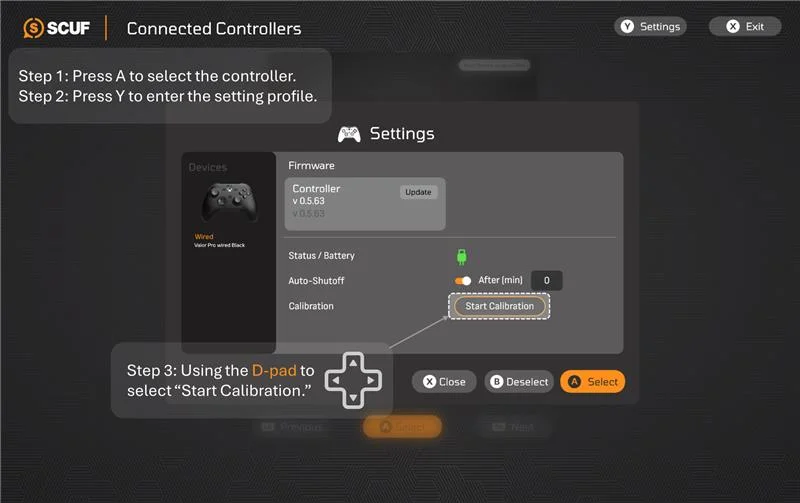
⚠After updating to V0.563, your joysticks will not work until you calibrate. Use the D-pad to navigate the next steps.
Calibrate your joysticks
Open the SCUF Valor Companion app, go to Settings, and tap Calibrate. Follow the on-screen instructions to complete calibration.
You're all set, your joysticks will now function normally. Enjoy the Valor Companion App beta!
For known issues and work arounds, please see the Valor Companion App beta FAQ